Enhancing Samsung.com’s Checkout for Faster, Easier Payments

Jul 202 - Aug 2023
Product design | UX research |E-commerce
About Samsung.com
Samsung.com is the official e-commerce platform for Samsung products, available on both web and mobile. As part of the Digital Business Platform team, our goal was to increase conversion by driving more online purchases.
Role
I led user research and product design, collaborating closely with data analysts and full-stack developers.
Results
• 19% decrease in cart drop off rate observed in New Zealand, Thailand, Philippine and Malaysia.
• 56% increase in customers applying the latest promotion code when purchasing the product.
• 60+ usability issues across 20+ webpages during audits, and documented them for future research.
0 / BIG PROBLEM

How might we make the checkout process smoother and reduce friction for consumers?

1 / CONTEXT

Samsung had been receiving numerous complaints from the marketing team.

More users chose third-party platforms over buying directly from Samsung’s website.
Promotions such as promo codes are frequently overlooked by users at checkout.

60% of users drop off before reaching the checkout page

Sample heat map data
2 / EXPLORE

Discover usability issues by observing users interaction data

20 pages were analysed across 7 regions as part of a content audit.
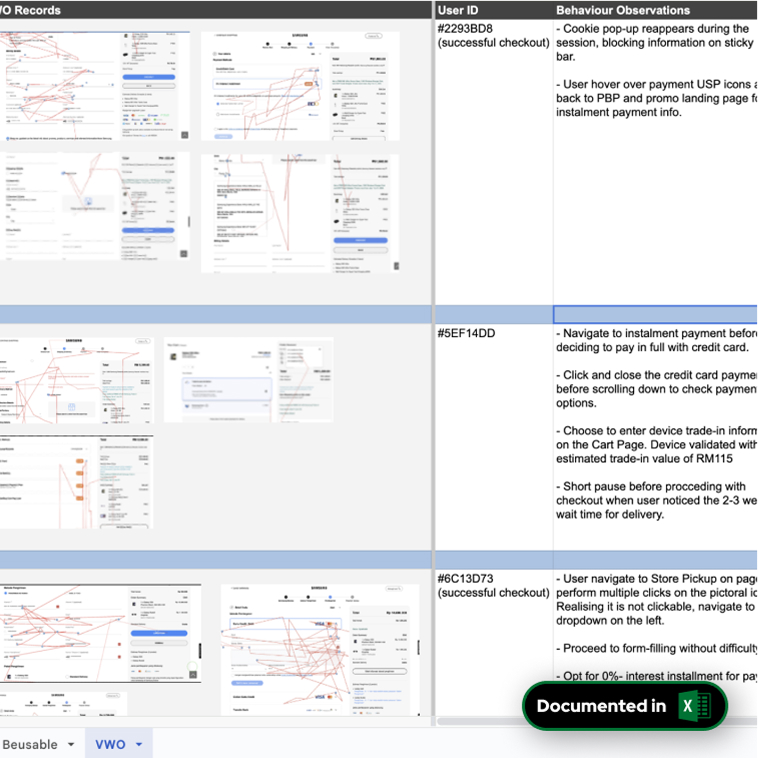
Through this process, more than 60 usability issues were identified, which have been documented in an Excel file.
Prioritise the most critical issues that needed to be addressed
After categorising the usability issues, I met with the PM and department lead to address business concerns and clarify any design restrictions.

I then conducted a heuristic evaluation to prioritise key issues based on development constraints, usability, and business impact.
Group similar usability issues to distill information into categories
I categorised the issues into 6 main parts that require redesign updates, which have been documented in the Miro board.

Now that we were clearer on the possible problems, we looked through past qualitative research about Samsung.com users

Users navigated back and forth across pages before proceeding to checkout.
Most of the users didn’t follow a straight path to checkout they jumped between pages and eventually abandoned the payment process.
Mobile users struggled to find where to apply a promo code.
unlike on desktop, the promo code section is hidden under a dropdown in mobile version, causing many users to miss it.
While consumers want details, too many pages and forms can frustrate them and cause drop-off before purchase.
a lengthy or fragmented purchase flow with too many pages and forms can overwhelm the users.
3 / DEFINE

With both quantitative and qualitative research on hand, I defined the problem statement needed to solve

How might we make the checkout process smoother and reduce friction for consumers?
We broke down the problem statement to two main problem spaces:
Ensure customers are aware of and can easily access promo information
Shorten the checkout input process
Improve the clarity and accessibility of payment information.
4 / DESIGN

I quickly jumped into exploration using the Samsung Design System

This was brought into a discussion with other designers and product managers.
Some rough ideas I explored

I lead the planning and execution of the user research

Each user research session included an in-context usability test, and a deep-dive interview.
I planned out a user research plan, consisting of a contextual inquiry and usability test, with feedback from a user researcher.
One of the scenarios we tested
I consolidated all our on-site notes and recordings, and conducted a mini affinity mapping session with my team.
After the research, I consolidated all our raw notes into an excel sheet where I ran a mini affinity mapping session online, for us to synthesise the research findings.
A sample of consolidated session notes consolidated in an Excel format.

We obtained a few insights which would go on to inform the final version of the design

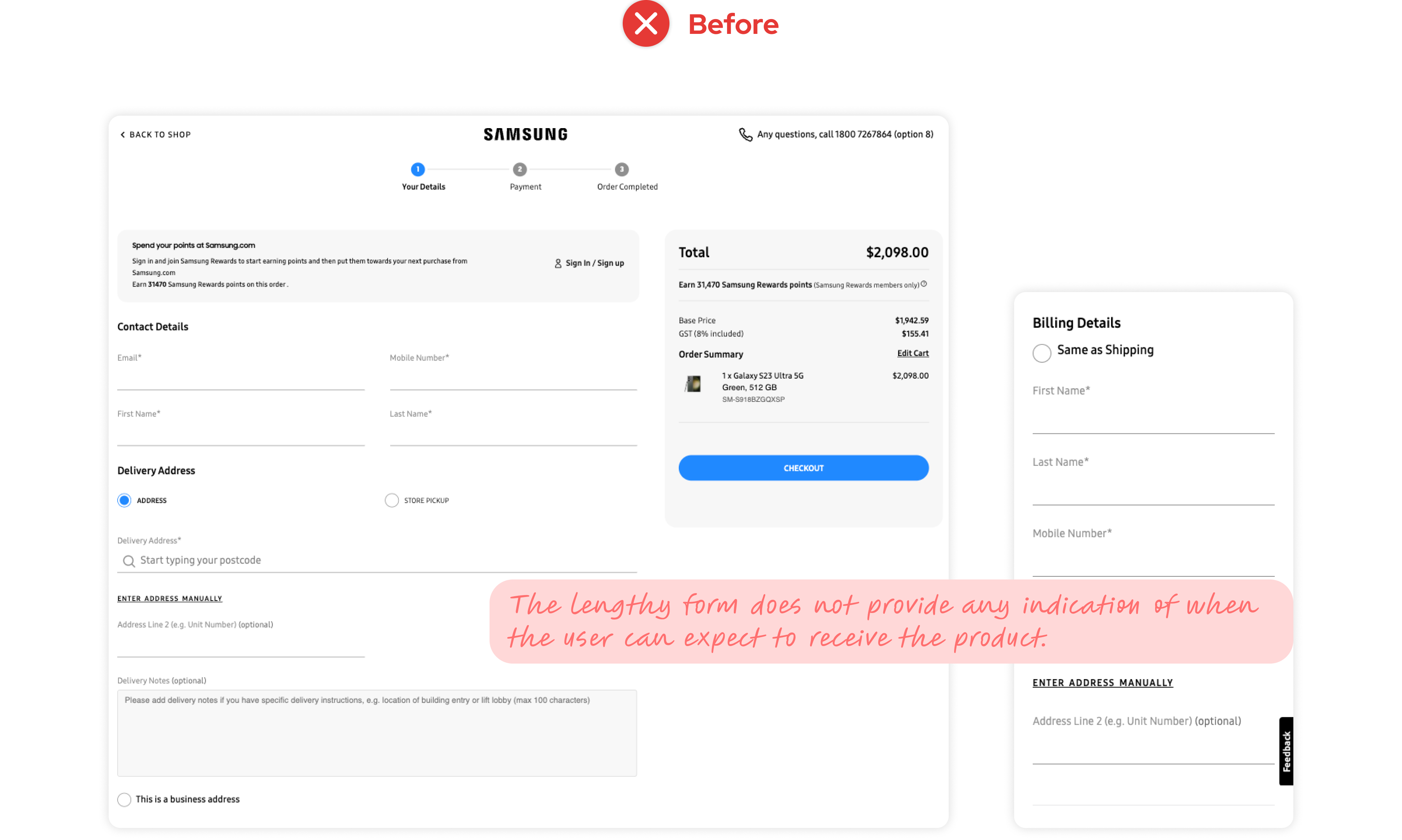
Users often abandon the process at the shipping and delivery step.
After completing a lengthy form, users aren't informed of the expected delivery time, which creates uncertainty. The more expensive the product, the more likely they are to abandon the purchase.
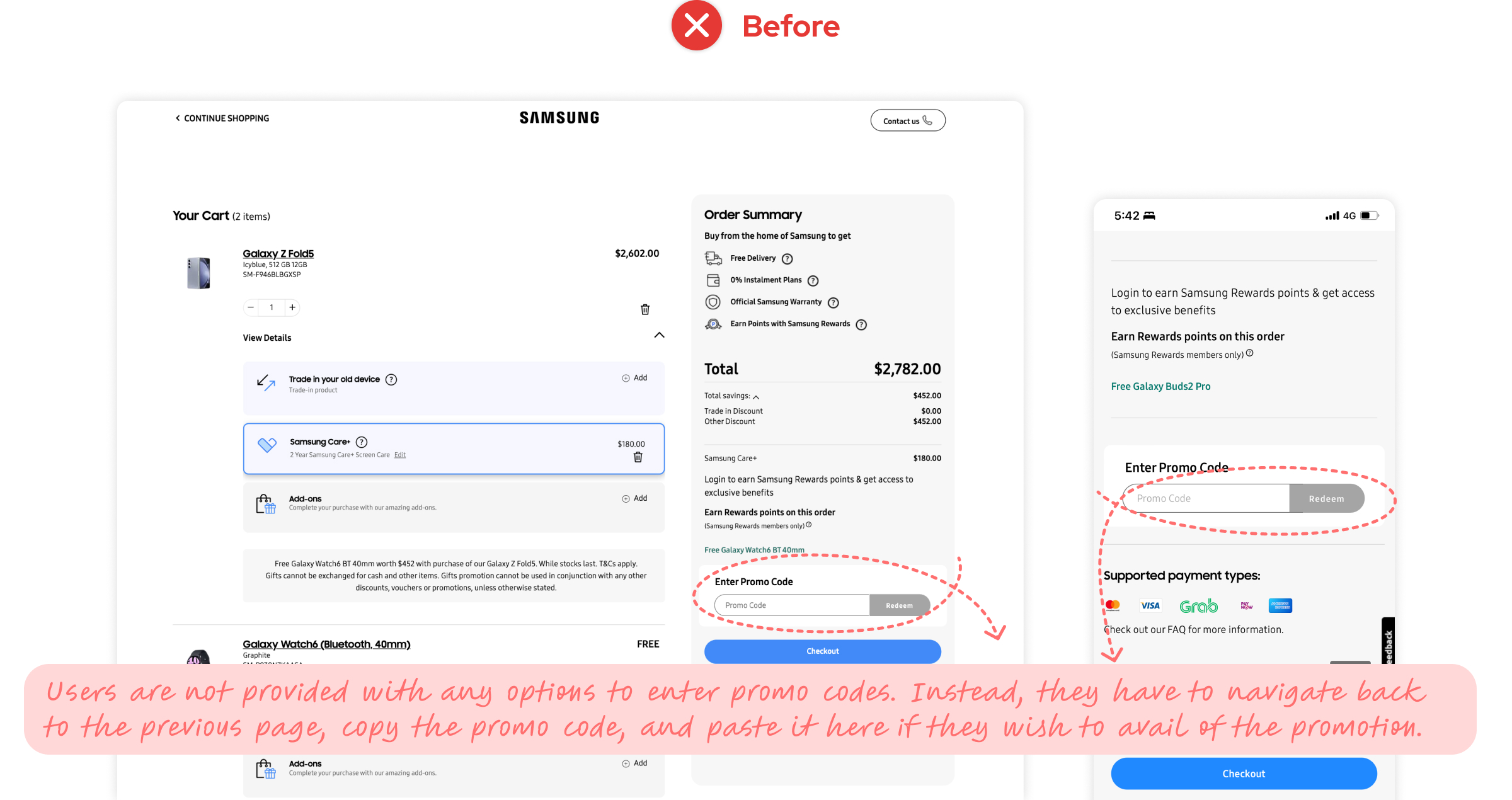
Users navigate back to the product page just to copy and paste the promo code during checkout.
Users tend to halt their checkout journey at this point. They either backtrack to the previous page to locate the respective promo code or abandon the journey altogether.
Users relied on trial and error to locate the payment information.
Customers need to spend more time or click through multiple drop downs to find their desired payment methods due to the complex payment methods structure.
5 / DELIVER

Final solution

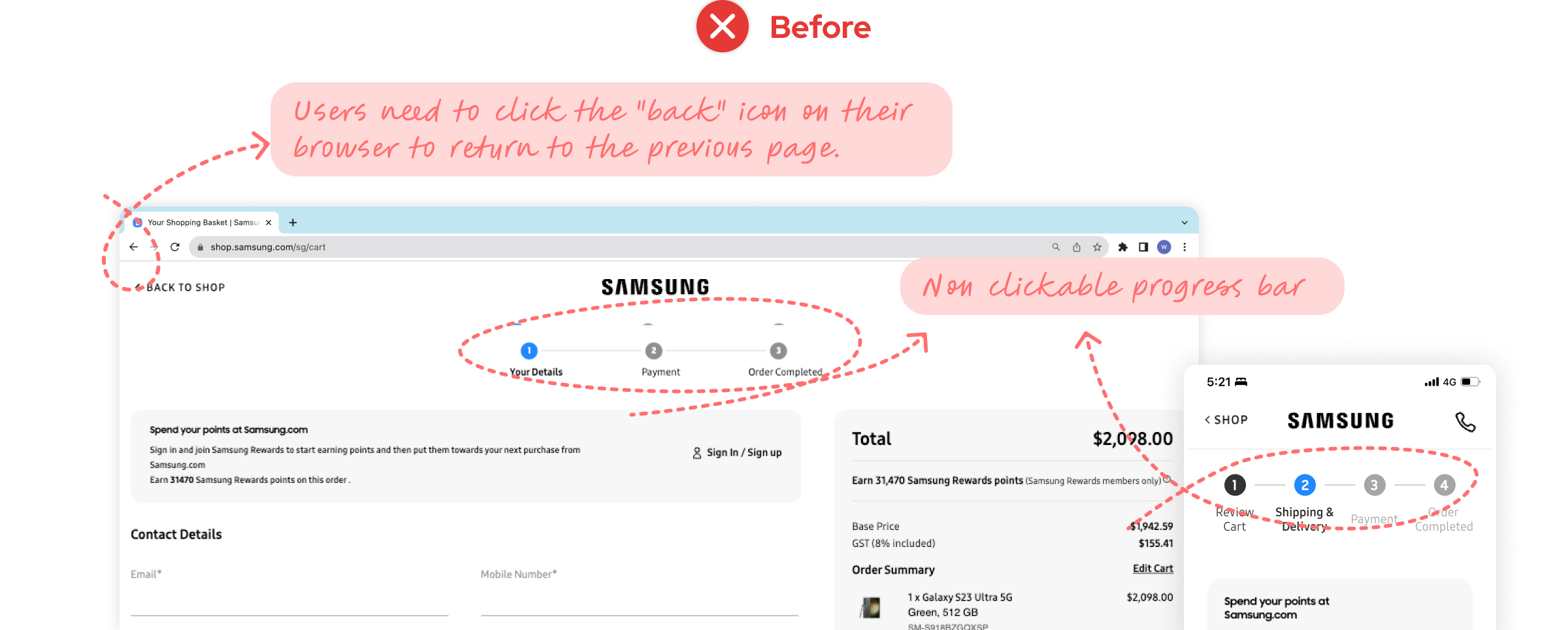
1. A clickable progress bar was added to allow users to easily navigate back to previous steps.
Users need to click the 'back' icon on their browser to return to the previous page. By adding a clickable progress bar, we allow users to easily navigate between steps without relying on the browser controls, creating a smoother and more intuitive checkout experience.
2. List of promotion codes for users to select and apply during checkout
we created a pop-up window lets users view and apply available promo codes directly on the same page, without navigating away.
3. A calendar feature to select preferred delivery date and specific time
We created a calendar feature allows users to conveniently select their preferred delivery date and time during checkout.
4. A clear display of various payment methods
A clear, structured list of payment methods was designed to minimise scrolling and improve selection efficiency.

Results

The optimised checkout flow led to a 19% reduction in cart drop-off rates in New Zealand, Thailand, the Philippines, and Malaysia, and a 56% increase in customers applying the latest promotion code during purchase.
cart drop off rate
after the product launch
19%
promotion code application
when purchasing the product
56%
UX audit
Usability issues identified
60+ pages
6 / AFTER THE PROJECT

Things I wish I did better

Striked a better balance between efficiency and effectiveness.
I wish I had been more strategic in planning research. In fast-paced projects, time was limited, and while research is crucial in UX, I sometimes rushed or skipped steps. I've since learned to choose the most efficient methods to uncover key issues while balancing design and development needs.
Started Data Analysis Earlier
I wish I had applied data analysis techniques earlier to guide my priorities. I drafted a design and was questioned by PMs, that’s when I realised I needed data to back up my decisions. Since then, using tools like bounce rate analysis and customer segmentation has helped me focus on the right problems and strengthened my design rationale.
BACK TO TOP ↑
SPH Digital Magazine Shopping Journey
Samsung Checkout Flow
CLH Wellness Score
ambertongsg@gmail.com
©Amber Tong 2025